
Introduction
This article will explore how to generate a maze using Python. We will provide a detailed explanation of the code provided and discuss the key concepts involved in maze generation.
Key Concepts
- Maze Generation: Maze generation is the process of creating a maze, typically represented as a grid, with walls and passages. The goal is to create a maze that is solvable and has a random layout.
- Randomness: Randomness plays a crucial role in maze generation. It ensures that the maze layout is unpredictable and provides a unique experience each time a maze is generated.
- Grid Representation: The maze is represented as a grid, where each cell can be either a wall or a passage. In the code provided, the maze is represented as a 2D list.
Here is the complete code
import random


def generate_maze(rows, cols):

    maze = [['#' for _ in range(cols)] for _ in range(rows)]


    for i in range(1, rows, 2):

        for j in range(1, cols, 2):

            maze[i][j] = ' '


    for i in range(rows):

        for j in range(cols):

            if i % 2 == 0 and j % 2 == 0:

                neighbors = []


                if i > 1:

                    neighbors.append((i - 2, j))

                if i < rows - 2:

                    neighbors.append((i + 2, j))

                if j > 1:

                    neighbors.append((i, j - 2))

                if j < cols - 2:

                    neighbors.append((i, j + 2))


                if neighbors:

                    random_neighbor = random.choice(neighbors)

                    maze[random_neighbor[0]][random_neighbor[1]] = ' '


    return maze


def print_maze(maze):

    for row in maze:

        print(" ".join(row))


if __name__ == "__main__":

    rows, cols = 11, 11  # Adjust the size of the maze

    maze = generate_maze(rows, cols)


    print("Generated Maze:")

    print_maze(maze)
Simply copy, paste and run!
Code Structure
Let’s break down each line of the provided Python code:
import random: This line imports therandommodule in Python, which provides various functions for generating random numbers. In this code, it will be used to randomly choose neighbours during the maze generation.def generate_maze(rows, cols):: This line starts the definition of a function namedgenerate_mazethat takes two parameters,rowsandcols, representing the number of rows and columns in the maze, respectively.maze = [['#' for _ in range(cols)] for _ in range(rows)]: This line initializes a 2D list (maze) with ‘#’ characters, creating a grid with the specified number of rows and columns.for i in range(1, rows, 2):: This line starts a loop iterating over the rows with a step of 2, skipping every other row.for j in range(1, cols, 2):: This line starts a nested loop iterating over the columns with a step of 2, skipping every other column.maze[i][j] = ' ': This line sets the value at the current row and column indices to a space (‘ ‘), creating open pathways in the maze.for i in range(rows):: This line starts another loop iterating over all rows.for j in range(cols):: This line starts a nested loop iterating over all columns.if i % 2 == 0 and j % 2 == 0:: This line checks if both the row and column indices are even, indicating a cell that can potentially be opened.neighbors = []: This line initializes an empty list to store neighbouring cells.if i > 1:toif j < cols - 2:: These lines add neighbouring cells above, below, to the left, and to the right of the current cell to theneighborslist, ensuring that the indices are within bounds.if neighbors:: This line checks if there are any neighbours to choose from.random_neighbor = random.choice(neighbors): This line randomly selects a neighbour from the list of neighbours.maze[random_neighbor[0]][random_neighbor[1]] = ' ': This line opens a pathway to the randomly chosen neighbour by setting its value to a space (‘ ‘).return maze: This line returns the generated maze.def print_maze(maze):: This line starts the definition of a function namedprint_mazethat takes themazeas a parameter.for row in maze:: This line starts a loop iterating over each row in the maze.print(" ".join(row)): This line prints each row by joining its elements with a space and separating rows with a new line.if __name__ == "__main__":: This line checks if the script is being run as the main program.rows, cols = 11, 11: This line sets the values ofrowsandcolsto 11.maze = generate_maze(rows, cols): This line calls thegenerate_mazefunction with the specified number of rows and columns and assigns the result to themazevariable.print("Generated Maze:"): This line prints a header indicating that the maze is being printed.print_maze(maze): This line calls theprint_mazefunction to print the generated maze.
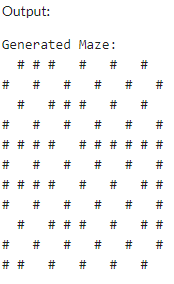
The code provided consists of two main functions: generate_maze() and print_maze(). Let’s discuss each function in detail.
generate_maze(rows, cols)
This function takes two parameters, rows and cols, which represents the number of rows and columns in the maze grid. It returns a randomly generated maze.
The function starts by initializing a 2D list called maze with walls represented by the ‘#’ character. It then iterates over the grid and sets every other cell to be a passage represented by a space ‘ ‘.
Next, the function iterates over each cell in the grid and checks if it is at an even row and column position. If it is, the function identifies the neighbouring cells that can be connected to the current cell. These neighbours are stored in a list called neighbors.
The function then randomly selects a neighbour from the list of neighbours and connects it to the current cell by setting the corresponding cell in the maze grid to be a passage.
Finally, the function returns the generated maze.
print_maze(maze)
This function takes a maze as input and prints it to the console. It iterates over each row in the maze and joins the elements of the row with a space separator. This creates a string representation of each row, which is then printed to the console.
Code Examples
Here’s an example of how to use the generate_maze() and print_maze() functions:
import random


def generate_maze(rows, cols):

    # Code for generating the maze


def print_maze(maze):

    # Code for printing the maze


if __name__ == "__main__":

    rows, cols = 11, 11  # Adjust the size of the maze

    maze = generate_maze(rows, cols)


    print("Generated Maze:")

    print_maze(maze)
In the example above, we import the random module and define the generate_maze() and print_maze() functions. We then set the number of rows and columns for the maze and generate the maze using the generate_maze() function. Finally, we print the generated maze using the print_maze() function.
Conclusion
In this article, we delved into the fascinating realm of maze generation using Python. We passionately dissected the crucial concepts behind maze creation and offered an intricate elucidation of the accompanying code. With this invaluable resource, you are empowered to embark on your own maze-generating journey, immersing yourself in exploring diverse and captivating maze configurations. Unleash your creativity and revel in the enchanting world of maze generation!
 Aviral Srivastava
Leave a comment